07: CNC milling, Molding & Casting
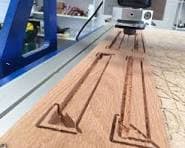
This week we worked on CNC, molding, and casting. For CNC, we used laterally cutting bits, uploaded DXF workflows, and configured cut depths and pass strategies.
1) CNC
- Developing the patterns
- Conversion to bitmaps
- Formatting and toolpath setup
- CNC milling
Object
I decided to CNC mill a tabletop piece of my roommates. I started by collecting photos and cropping them into square face references.
Here are two of the images before processing:


I explored multiple tools to simplify the images into line art:
- Pixlr drawing tools
- Photostyle Lab
- Procreate (iPad)
- ChatGPT (the one I ended up using)
After generating stylized outputs, I used Inkscape edge detection and vector cleanup to prepare geometry for CNC.

2) Molding and Casting
- 3D-printing the two-part mold
- Making plaster and casting test parts
I used a Fusion workflow for a two-part mold design and iterated on fit, release direction, and cavity quality.
3D mold source file: week7-cnc-molding-2part-mold.f3d
Tutorial reference: Product Design Online - two-part molds in Fusion 360